Launching runs
The launch wizard starts runs from the browser. It collects a task, an agent, a model, an execution mode and a few run options, then runs ssebench run --keep-container once per task (as uv run ssebench, unless SSEBENCH_CLI says otherwise), in the SSEBench checkout that the web UI serves. What a launched run does is what ssebench run does, so everything on that page applies.
The wizard needs the web UI to run from a checkout, as in just webui. The container image has no checkout, so it has no models, agents or local tasks to offer and can show runs but not launch them. A hosted server refuses launches.
A launch runs on the runner backend that SSEBENCH_BACKEND names, like ssebench run on the command line. A backend that cannot build images needs SSEBENCH_PREBUILT=1 in the server's environment; see Runner backends.
Before you launch
The wizard does not start anything that the command line would not. Have these ready first:
.envwith the proxy secrets and the key of your model's provider.just setupwrites the file; see Local stack. The run starts the LiteLLM proxy if it is not running.- Docker,
uvand the images the task needs. The first launch of a task builds its case image, which can take minutes; the launch output shows the build. - A model that works. The wizard lists every model in
models/*.yamland warns about a model whose provider key.envdoes not set, using the checks ofssebench doctor; it does not stop you. A model without a key fails when the agent first calls it. Thedummyandreferenceagents make no model calls, so they need no key.
The wizard
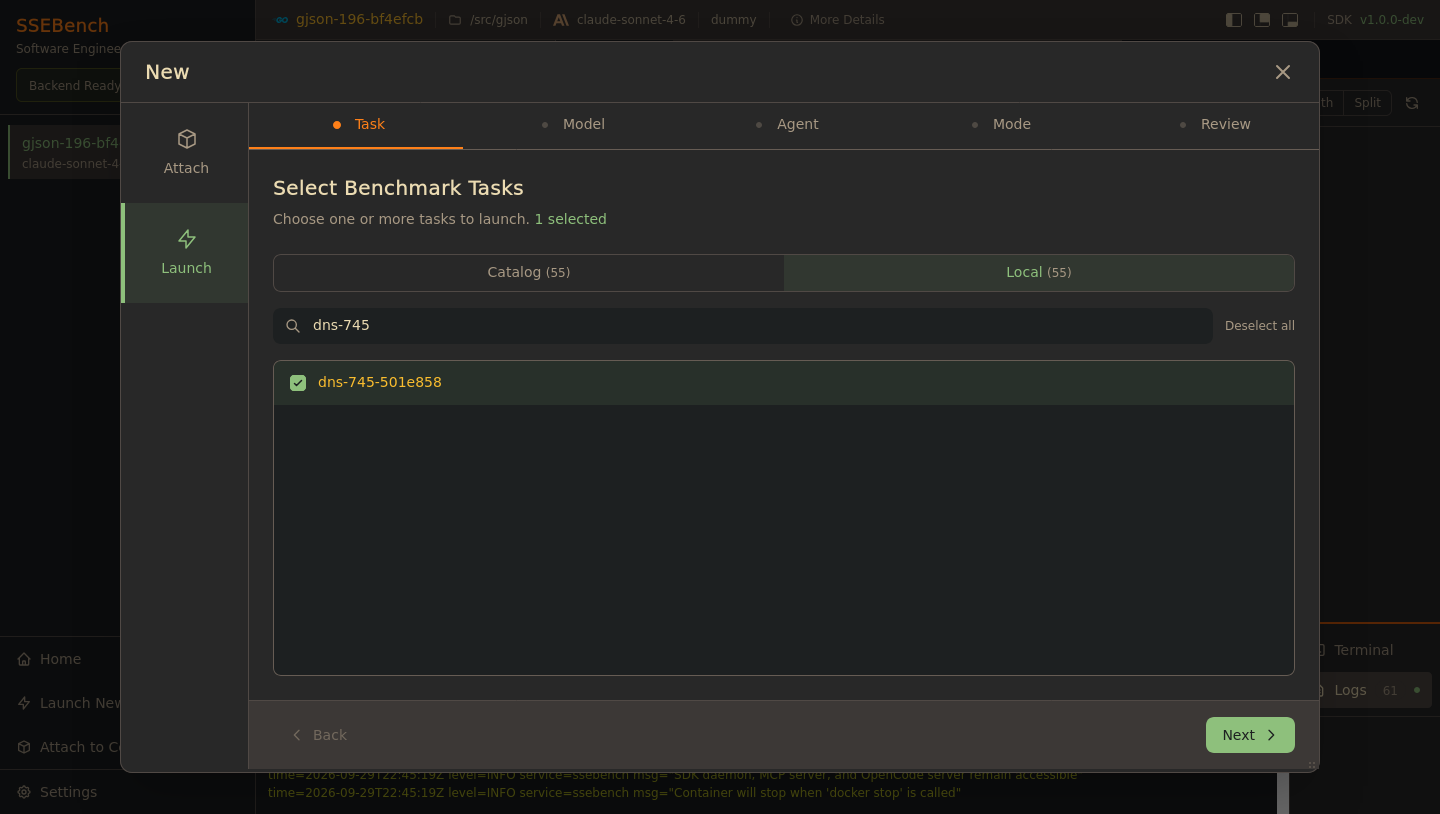
Click Launch New Test in the sidebar or on the home page. The Launch tab of the dialog has six steps, and a step needs a choice before Next works. Back, the step tabs and the Edit links on the last step return to an earlier step.
1. Task
Pick one or more tasks from one of two sources:
| Tab | Lists | Set by |
|---|---|---|
| Catalog | The tasks of the task catalog, with their language | SSEBENCH_CATALOG, else the bundled pilot manifest |
| Local | The task folders of a dataset directory | SSEBENCH_LOCAL_TASKS, else datasets/pilot in the checkout |
A tab is disabled when its source has no tasks: Catalog shows off when no catalog is configured, and SSEBENCH_CATALOG can be the path or URL of a manifest, a dataset directory, or a catalog service. Both variables are listed in Environment variables.
The search box filters by task ID, language or project. The list shows the first 100 matches, and Select all selects only those. Switching tabs clears the selection.
A catalog task runs like ssebench run --catalog <location>: its case image is pulled from the registry, and built from the task folder if the pull fails. A local task runs like --local <directory> and always builds its case image from the folder.
2. Agent
One card per directory under agents/: claude-code, codex, dummy, opencode and reference at the time of writing, and any agent you add. claude-code is selected first. The cards show a description only for claude-code and codex.
3. Model
The models of models/*.yaml, grouped by provider. No model is selected when the step opens, so you have to choose one. To add a model, see Add a model.
A model whose provider key is not set in .env says Key missing on its card, and choosing it shows which variable to set. The proxy reads provider keys from .env only, when it starts, so after adding a key restart it with ssebench proxy up. The warning needs uv run ssebench doctor --json to work in the checkout; without it the wizard shows no warnings.
The reference agent makes no model calls, so for it this step only says that no model is needed, and the run's model is none.
4. Mode
Sandbox runs the agent and the SDK in one container. Sidecar runs them in two, and is experimental; see Sandbox and sidecar.
5. Options
Each option starts at the default of ssebench run, and only a value you change is passed on:
| Option | Choices | Default |
|---|---|---|
| Difficulty | 0 to 4, as in Difficulty levels | 2, NO_FUTURE_TEST |
| Timeout | Whole minutes, 1 to 10080 | 60 (--timeout takes seconds; the wizard converts) |
| Network egress | Restricted reaches the LiteLLM proxy but not the internet; Open also reaches the internet | Restricted; see Integrity and egress |
| Plugins | The plugins that runtime/plugins/plugins.yaml declares | The plugins that file enables |
Plugins run in sandbox mode only. Selecting plugins replaces the ones that plugins.yaml enables for that run, as --plugin does, and a run cannot switch off every plugin that the file enables.
6. Review
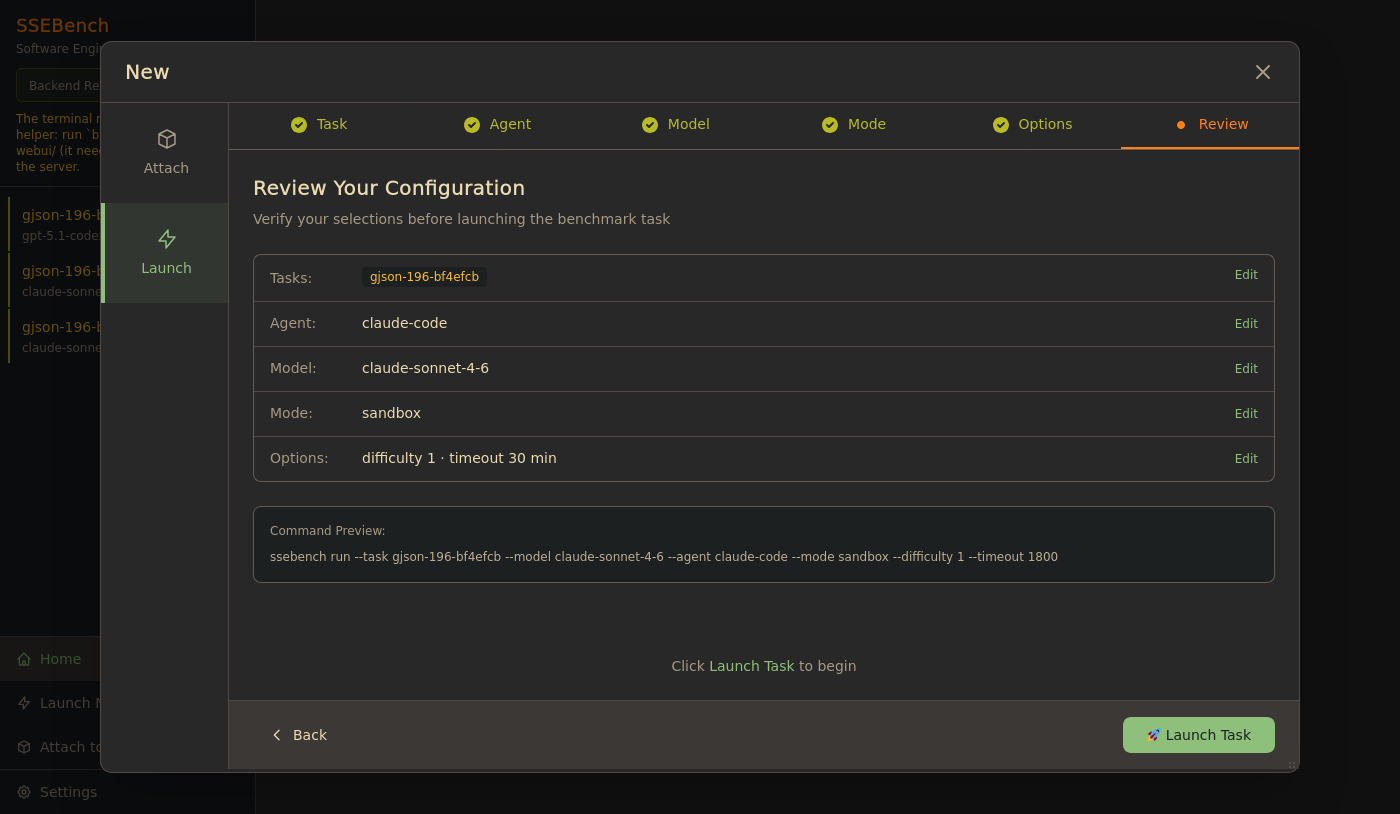
The summary lists the choices, and the preview shows the command each task corresponds to, with the options you changed. The button reads Launch Task, or Launch N Tasks when you selected several.
Launching several tasks starts all their ssebench run processes at once, with no limit. Each builds images and starts a container, so a large selection can exhaust the host's CPU, memory or disk.
Each launch has an ID, which the web UI passes to ssebench run --run-id, and the run writes results/<task>/<model>/<agent>/<id>/. Launching a task twice with one agent and model therefore keeps both results, as two trials.
The wizard does not offer --tool-layer. To change it, start the run from the command line with --keep-container and attach to it, as described in Watching a run.
What a launch does
Each launched task runs
ssebench run --model=<model> --agent=<agent> --task=<task> \
    --mode=<mode> --run-id=<launch id> --keep-container --local=<directory>
with --catalog=<location> instead of --local for a catalog task, no --model for the reference agent, and --difficulty, --timeout, --egress and --plugin when you changed them. The command runs in SSEBENCH_PATH (the checkout, by default the directory above webui/) with the environment of the web UI server, so COMPOSE_PROJECT_NAME, LITELLM_PORT and SSEBENCH_REGISTRY in that environment or in .env decide which proxy stack and images the run uses. The arguments are passed as an argument vector, never through a shell.
--run-id sets the label ssebench.run-id on the run's container, and the web UI finds the run by it through the backend (ssebench runs list). The launch ID is a fresh UUID for every launch, and the run's ID everywhere in the UI.
The server accepts only a model from models/, an agent from agents/, plugins from plugins.yaml and a local task from the local dataset. It rejects anything else with a 400.
Following a launch
Each launch gets a card in the sidebar that reads Launching... with the task ID. While it is there:
- Click the card to read the output of the command: the proxy start, the image builds, then the container's output. The view keeps the last 5000 lines and shows the command at the top, including the absolute path of the checkout.
- Cancel (the cross on the card, or the button in the view) stops the launch. It works only until the container exists.
- A launch that fails turns the card red, with the exit code, for example
Process exited with code 1, orThe run ended without starting a container. The output tells why; Dismiss removes the card.
While a launch runs, the bottom Logs tab of the run you are looking at shows a Launching badge. Those logs belong to that run, not to the launch; the launch output is in the sidebar card.
The web UI finds the run's container by the run ID that it passed to the CLI, so each launch gets its own container even when you launch the same task several times, or others use the same Docker daemon. When the container appears, the card is replaced by a tab for the run. The web UI switches to it if you were watching the launch, and otherwise leaves your view alone. See Watching a run.
What a launched run leaves behind
The container of a launched run stays after grading, because of --keep-container. The ssebench run process that started it keeps running in the background of the web UI server until the container stops. Then it does what it does for every run:
results/<task>/<model>/<agent>/<id>/in the checkout, where<id>is the launch's ID, hasresult.json,archive/dialog.jsonl,final.patchand the logs, which the container writes;summary.jsonin that directory, the run summary, records the run's settings, the grade and the model spend. Results format describes both.
Stop the container when you have looked at it; see Containers. Until then the summary is not written. Sending SIGTERM to the ssebench run process (kill <pid>) stops the container too, and the CLI still writes the summary, from whatever the run had produced. A kept container serves its API for as long as it runs.
If the web UI server itself stops while a launched run is in progress, the run loses its output pipe and may not finish cleanly; restart the server only between runs.
Sidecar runs
A sidecar run with --keep-container keeps two containers and two volumes, all labelled ssebench.run. The web UI tracks the task container, which holds the daemon. The agent container has no web UI label and is not listed. Remove both containers and both volumes yourself when you are done.
The evaluator of a sidecar run runs in the agent container, and writes the grade to the results directory that both containers mount. The Evaluation Result tab shows it from the daemon, or, when the daemon has none, from that directory on the host.
Next steps
- Watching a run: the dialog, the diff, the terminal and the grade
- Security model: who can launch runs
- CLI: every option of
ssebench run