Watching a run
The run view shows one run: what the agent said and did, the diff it left, the grade, the container's logs, and a shell in the container. While the run's container exists, the dialog, the diff and the grade come from its own daemon, which the web UI reaches at the address that the runner backend gives for port 4263. With the Docker backend that is the container's IP address, so the web UI has to run on a host that can route to container addresses, as a Linux Docker host does. Once the container has stopped, or has been removed, the same views come from the run's directory in results/; see Finished runs.
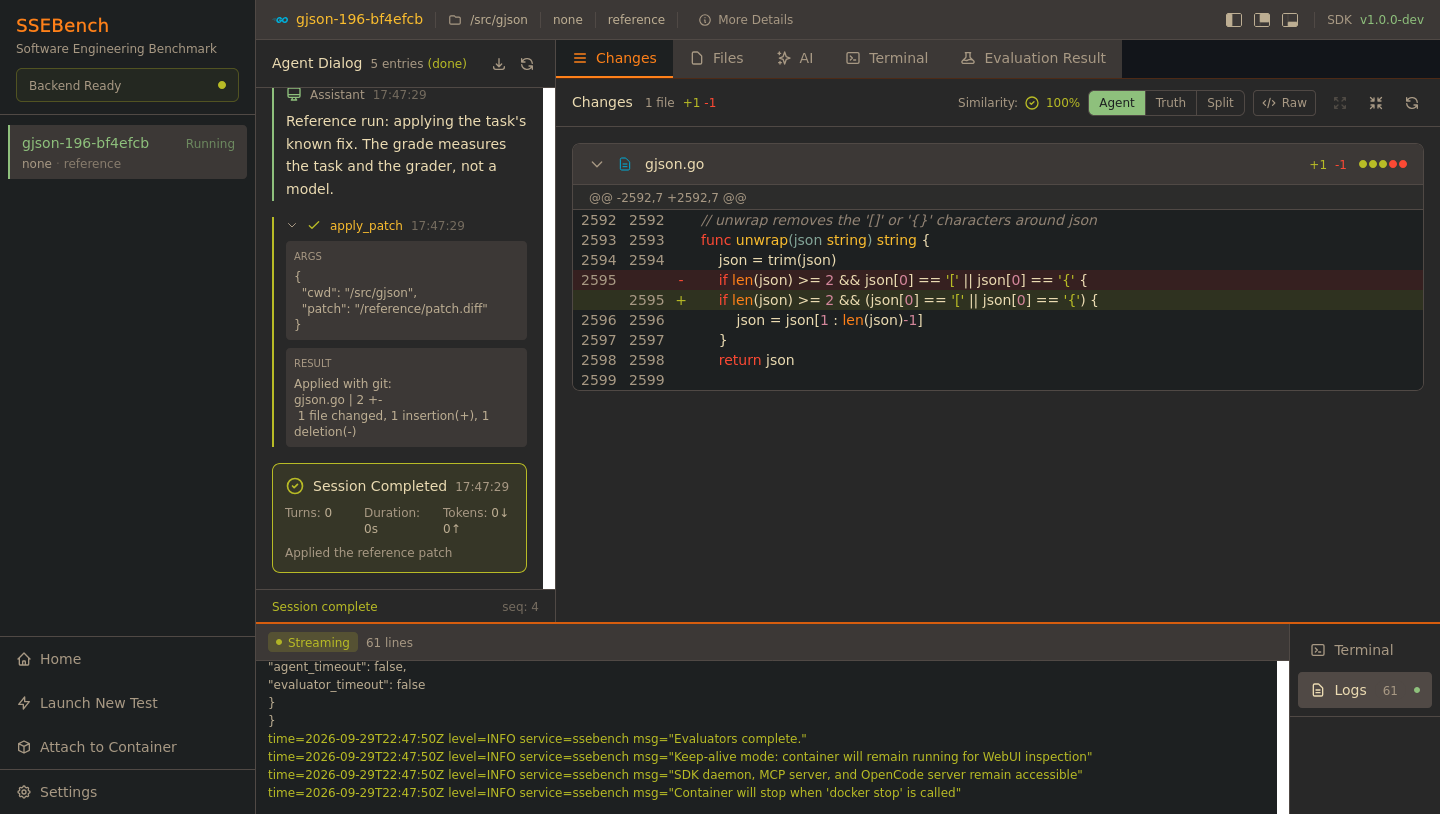
Getting to a run
The sidebar has one tab per attached container. It shows the task ID, the model and the agent, and whether the container is running.
- When the page loads, the web UI attaches every running container that carries the label
ssebench.webui. Containers that exited are not attached. - Attach to Container lists all such containers, and the finished runs in
results/that have no container any more (marked Finished), in four tabs: Running, Exited, All, and Recent for the last ten you attached in this browser. Filter by task, model, agent, image or container name, select a row and click Attach. - A container you launch from the wizard is attached for you; see Launching runs.
- A run started with
ssebench run --keep-containerappears in the list too, whoever started it.
The list is every run with that label on the backend, whoever started it and whichever Compose project it belongs to. On a shared daemon you see other people's runs, and can stop them.
Runs from the command line
--keep-container keeps the container running after grading, so the web UI can show it. The CLI then waits until the container stops, and writes the run summary at that point:
uv run ssebench run --local datasets/pilot --task gjson-196-bf4efcb \
    --agent reference --keep-container
Stop the container with ssebench runs stop <run-id> (or docker stop). The CLI takes that as the normal end of the run and writes the summary; it logs an error only when the container ends some other way, or is stopped before the grade was written. A SIGTERM or SIGINT to the CLI stops the container the same way, and the summary is still written.
Layout
The bar at the top of a run shows the task ID and its language, the source directory inside the container, the model and the agent. More Details opens the task's description, crash reports and PoC files, and the SDK version is on the right. The three buttons next to it hide and show the left, center and bottom areas.
| Area | Contents |
|---|---|
| Left | Agent dialog |
| Center | Changes, Files, AI, Terminal, Evaluation Result; the AI and Terminal tabs only for a run with a container, on a server that allows them |
| Bottom | Terminal and Logs |
The dividers between the areas can be dragged. Settings in the sidebar moves the tab bars and changes the terminal colors.
While the container starts, the panels read Initializing SDK.... The web UI waits up to 25 minutes for the daemon to answer, then polls it every 1 to 10 seconds, faster while things change, through one WebSocket per run.
Agent dialog
The left area replays dialog.jsonl, the file that the agent writes in $SSE_ARCHIVE (see Dialog protocol):
| Entry | Shows |
|---|---|
| Session Started | The agent, the model and the task |
| Task Prompt | The prompt the agent got, shortened to 300 characters with Show more |
| Assistant | The agent's message as Markdown, with its token counts |
| Thinking | The reasoning, collapsed until you click it |
| Tool call | The tool's name, arguments and result, with a status: running, success or error. Results are cut at 1000 characters |
| Session Completed, Failed or Timed Out | The number of turns, the duration and the total tokens |
The footer reads Waiting for agent..., Live while entries arrive, and Session complete once the agent has finished or a grade exists, with the number of the latest entry. The download button saves the entries as dialog.jsonl, and the refresh button reconnects.
An agent that writes no dialog leaves the panel at No dialog yet. The dummy agent writes none.
Changes and files
Changes shows the agent's diff: every change in the source tree since the vulnerable commit, with the files collapsible, the added and removed lines counted, and syntax highlighting. Parsed and Raw switch between the cards and the plain diff, which you can download as patch.diff. Files lists the changed files with A, M, D or R and their line counts.
The reference patch
Once the agent's phase is over, the daemon serves the task's reference patch, and the header gains three buttons:
| Button | Shows |
|---|---|
| Agent | The agent's diff |
| Truth | The reference patch, under a purple banner that names it "ground truth" |
| Split | Both, side by side |
Next to them, Similarity is the share of changed lines that the two diffs have in common, after normalizing whitespace, in green from 80%, yellow from 40% and red below. It compares text and is not a grade; the grade is the Evaluation Result. The reference patch is fetched once, when the run opens. If you opened it while the agent was still working, the buttons stay missing until you reload the page.
Evaluation Result
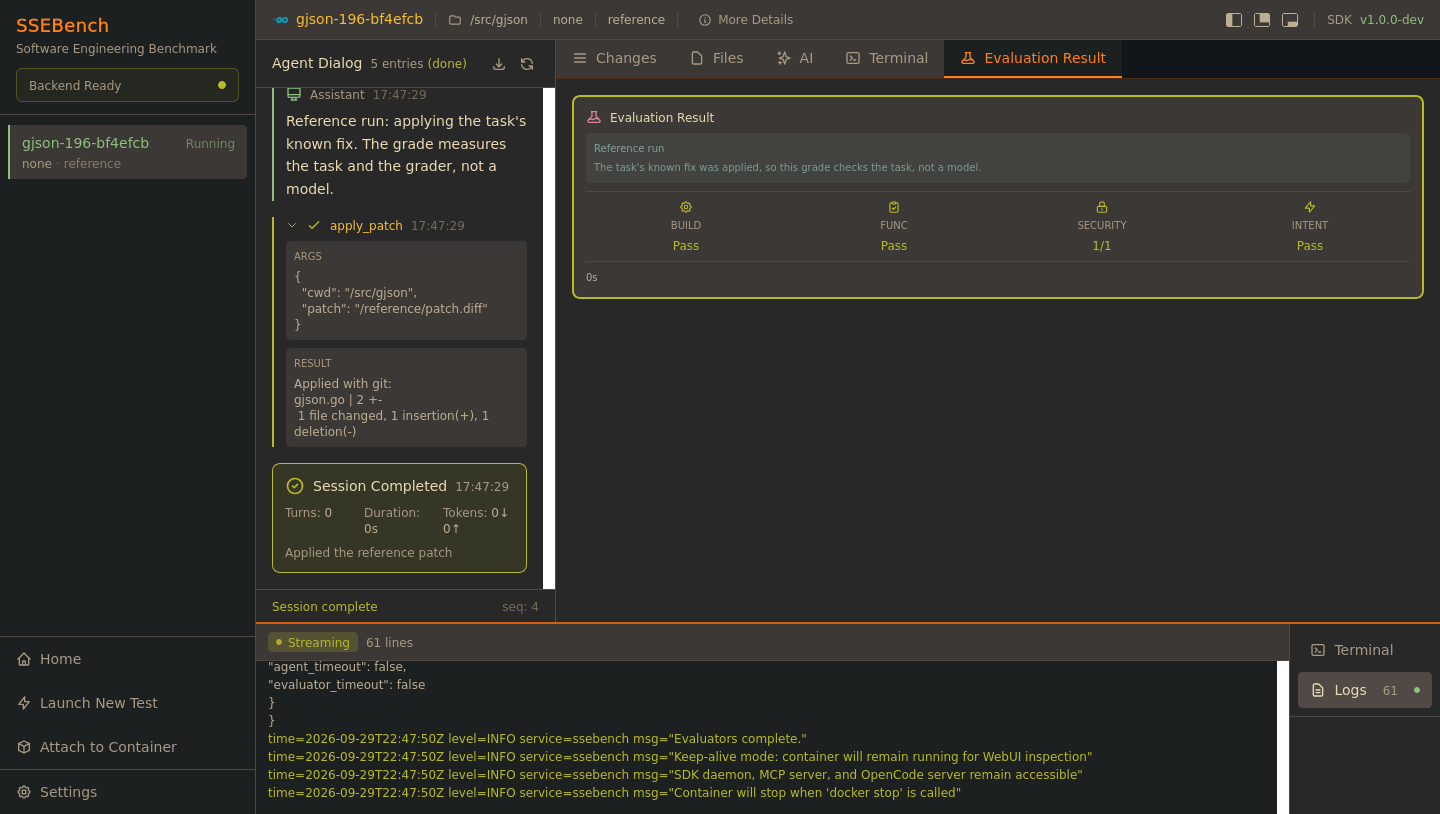
The tab reads No evaluation yet until the evaluator has written the grade. The card then shows the checks of the grading pipeline:
| Check | Shows |
|---|---|
| Build | Whether the project builds with the patch |
| Func | Whether the project's own tests pass |
| Security | How many of the task's proofs of concept the patch defeats, as passed over total |
| Intent | Whether the tests of the upstream fix pass |
Below the checks it shows how long the agent ran, a TIMEOUT mark if it hit its time limit, and the evaluator's error message, with the error log behind Show log. N/A marks a check that did not run for the task.
On a reference run the card carries a note that the grade checks the task, not a model.
The grade comes from the container's daemon. When the daemon has none, or the container has stopped, the web UI reads result.json from the run's results directory on the host instead: the run's own directory, which the container's ssebench.results label names.
Logs
The Logs tab streams the container's output from its start (ssebench runs logs --follow): the entrypoint, the daemon, the MCP server, the agent and the evaluator. It follows the end unless you scroll up; Bottom jumps back. A finished run without a container shows the agent.log and evaluator.log that its run directory kept.
Terminal
The terminal is a shell in the container, started with ssebench runs exec --tty, which the Docker backend turns into docker exec -it, as the image's default user, which is root. Use it to look at the project, the results in $SSE_ARCHIVE (/tmp/sse-archive) and the task files under /ssebench. The toolbar changes the font size, searches, clears and restarts the shell.
- It needs the
pty-proxyhelper.just webuibuilds it when Go is installed; otherwise runbun run build:ptyinwebui/yourself, which needs Go. The container image includes it. Without the helper,/api/healthreportsterminal: falsewith a hint, the sidebar shows the hint, and the terminal tabs are hidden, while the rest of the run view works. - The container has to be running, and the backend has to be able to run commands in it (
supports_exec). Otherwise/api/healthreportsterminal: falseand the tabs are hidden. SSEBENCH_WEBUI_TERMINAL=0turns the terminal off and hides its tabs, and so does hosted mode; see Security model.- A terminal process is cleaned up after five minutes without activity; the
PTY_*variables in Environment variables change that.
AI assistant
The AI tab runs OpenCode in the container as a debugging assistant. It comes with prompts for comparing the agent's fix with the reference patch, for reviewing the changes, and for looking for problems. The assistant can run commands in the container. Read the key and the assistant before you use it. The tab is missing on a run without a container, on a backend that cannot run commands in a run, and in hosted mode. Which model it uses depends on the run:
- A run with a model (any agent but
reference, in sandbox mode): the assistant uses that model through the run's LiteLLM proxy, which a container on the defaultrestrictednetwork can reach. You need no key. It runs as a second OpenCode server in the container, on port 4098, and has a proxy key of its own with a budget of 5 dollars, made with the master key from.env, so what it spends does not count as the run's spend in the summary. The header of the tab names the model. - A run without a model (the
referenceagent, or a sidecar run's task container), or a web UI that cannot make that key: the assistant works with your own Anthropic API key, which you enter under Settings, and calls Anthropic from inside the container. A container on therestrictednetwork cannot reach the internet, so it cannot answer there; use a run started with--egress open.
When the model cannot answer, the tab shows why instead of staying silent: the provider's error, for example a missing key at the proxy, or, while OpenCode retries, a banner that says it is waiting for the provider. An error that looks like an unreachable provider says so and suggests the two fixes above.
Finished runs
ssebench run writes every run to results/<task>/<model>/<agent>/<run-id>/ and, when the run ends, summary.json in it. The web UI lists each such run that no container backs any more, marked Finished, and shows what the directory holds (see Results format):
| View | Read from |
|---|---|
| Task bar, More Details | The task in summary.json |
| Agent dialog | archive/dialog.jsonl |
| Changes and Files | final.patch, the patch the grader applied |
| Truth, Split | reference.patch, else the task folder of the local dataset |
| Evaluation Result | result.json |
| Logs | agent.log and evaluator.log |
The terminal and the AI assistant need a container and are missing. The same views come from the directory for a container that has stopped, so a kept container that you stop does not lose them. No container is needed, and no backend: a server that only has a results/ directory, such as hosted mode on a machine without Docker, shows the finished runs in it.
The web UI reads results/ in SSEBENCH_PATH, where the runs it launches write. ssebench runs results prints the same list. The files are read as plain files only: a link in archive/, which the agent can write to, is not followed. Two runs that reuse one run ID show as one, the newest.
Containers
Hover over the tab of a container and click its cross to open Detach Container?:
| Choice | Does |
|---|---|
| Detach | Closes the tab. The container keeps running, and you can attach again |
| Detach + Stop | Closes the tab, kills the container and removes it. Offered for a running container |
| Detach + Remove | Closes the tab and removes the container. Offered for a container that has stopped |
A finished run that has no container, and every run on a hosted server, offers only Detach. | Cancel | Does nothing |
The web UI only touches runs with the label ssebench.webui, named by run ID. A container that stops by itself, or by docker stop, stays on the list as Exited. You can remove it with Detach + Remove once it is attached, or with Remove in the Attach to Container list. Stopping and removing can be repeated: stopping a container that has already stopped, or removing one that is already gone, succeeds without doing anything. Removing a container does not touch its results/ directory.
A kept container serves its daemon API, including the reference patch, for as long as it runs. Stop kept containers when you are done, and do not keep finished containers of a task while other runs of that task are in progress; see Integrity and egress.
Next steps
- Launching runs
- Dialog protocol: write a
dialog.jsonlfor your own agent - Results format: what the CLI records for a run
- Security model